


1 Powering on the Zoom
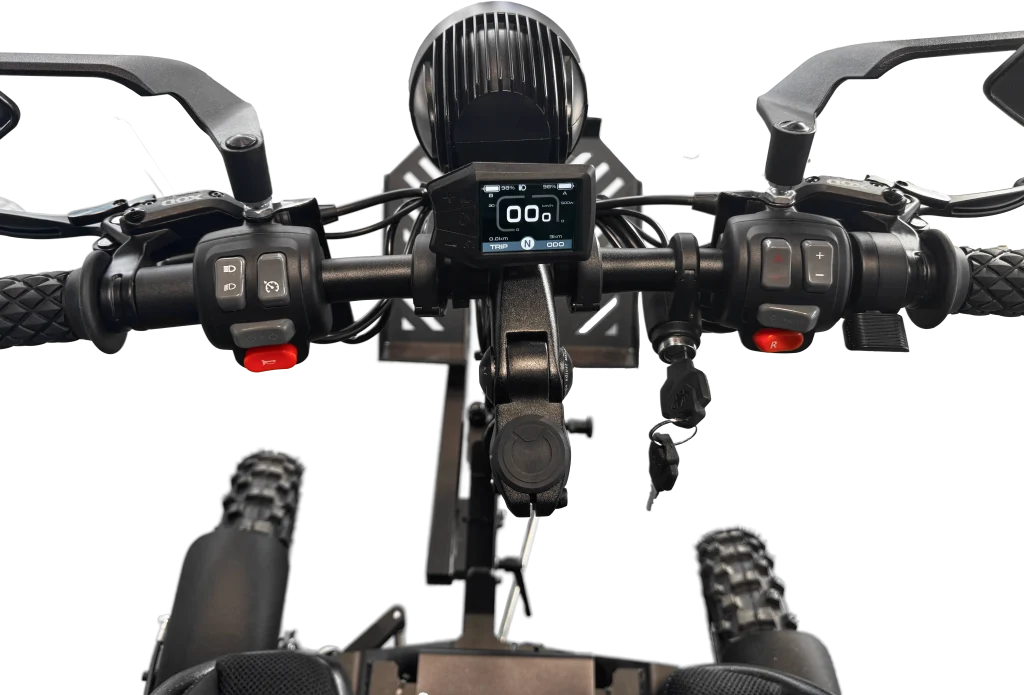
Turn the master key switch on to power the Zoom on. The display will light up.
2 Selecting the speed level
When the Zoom is first powered on, it will start in N (neutral) mode. This means that the throttle is not active and the Zoom cannot move. In order to start accelerating, you need to press the + button on the right side button controls. The display will show the selected speed level 1-2-3, where 3 is the fastest. You can decrease the speed level with the – button on the right side button controls. Make sure the red R-button is in the OFF position to drive forward.
3 Applying the throttle
When seated in the Zoom, push the throttle slowly until you feel the motors move. Do not “pump” the throttle which will result in jerky operation.
The Zoom can be equipped with an optional twist-throttle for users that require it. The operation is similar to the standard thumb throttle, but is performed by twisting the handle.
When the Zoom starts to move, keep a controlled, slow speed and practice your ability to drive along slowly. Practice this on both flat and uneven surfaces. Ride at slow speeds with gradual acceleration and turning. Practice smooth throttle application.
Practice slowing down before turning. Practice maintaining a steady throttle through the turn. Avoid hard acceleration when turning, even from a stand-still position.
4 Operating in reverse
Press the red R-button (reverse) to activate the reverse operation. The Zoom will operate in reverse and you must ensure no person or object is behind you.
5 Slowing and stopping
Improper use of the brakes can cause the tires to lose traction, reducing control of the Zoom and increasing the possibility of an accident.
5.1 With Motor brake activated (default)
To slow or stop, release the throttle, the motors will firmly slow down the speed until you come to complete stop. Apply the brakes if you want to brake more aggressively. The left handle is for the rear brakes, and the right handle is for the front brakes.
If your Zoom is equipped with the optional single brake lever, this brake will apply both front and rear brakes simultaneously. Sudden or excessive application of the front brake can cause the Zoom to tip forward, especially when going downhill.
5.2 With Motor brake deactivated (by authorized distributor)
When you let go of the throttle, the Zoom will continue forward just like a bicycle (freewheeling). To stop the Zoom, apply the brakes smoothly; releasing the throttle alone will not slow the Zoom. Never try to slow or stop the Zoom by putting your feet on the ground.
Practice controlled stopping in various riding environments. Braking ability is affected by type of terrain. In most cases, gradual application of the brakes is more effective than abrupt braking, particularly on loose surfaces such as gravel. Always allow for greater braking distance on rough, loose, or slippery surfaces.
If the brake function is unsatisfactory, stop riding and have the brakes inspected by your local reseller, a motorcycle- or electric bike repair shop.
6 Turning
Steer by turning the handlebar. Notice that the left front wheel is a little forward of the right front wheel. This helps the Zoom crawl over uneven terrain. This also means that it handles differently when turning left and right. Practice and get used to turning left and right at low speeds.
Slow down before entering a turn. Turning the handlebar too far or too fast can result in loss of control or a rollover. When making tight turns from a standstill or at slow speeds, avoid sudden or hard acceleration. Riding aggressively or making abrupt maneuvers even on flat, open areas can cause rollovers.
7 Operation in hilly terrain
Braking and handling are affected when operating on hilly terrain. Improper operation could cause loss of control or rollover. Avoid excessive speed when riding downhill.
Ride straight up and down inclines, not across them. If crossing a hill is unavoidable, ride slowly. Turn downhill immediately if you feel the Zoom may tip. To climb a hill, you need traction, momentum, and steady throttle. If you start to lose traction or momentum when climbing, and you decide you will be unable to continue, use the brakes to stop. Roll backward downhill in a controlled manner, using the front (uphill) brake to control speed. Never apply the rear brake when rolling backward downhill.
When going straight downhill, control speed primarily using the rear (uphill) brakes. Applying the front brake (right handle) too hard or too fast could cause the Zoom to tip forward. Hard application of the brakes could also cause the Zoom to slide on flat surfaces.
8 Ride with caution
To reduce the risk of loss of control and rollovers, use proper riding techniques and ride defensively. Look ahead and plan for slopes, rough terrain, ruts, loose or slippery surfaces, and other changes in terrain or traction. Never operate at speeds too high for your skills or conditions.
9 Other safety features
The Zoom is equipped with 3 safety settings in default configuration. These settings can be turned off by an authorized distributor.
- Glide regeneration (motor brake)
This feature gives the Zoom the ability to brake to a stop when the throttle is released. Glide regeneration is turned on in factory settings but can be turned off or adjusted by an authorized distributor. - Brake regeneration
When turned on the motor brake will also be activated when the brake levers are pressed. Brake regeneration is turned on in factory settings but can be turned off or adjusted by an authorized distributor. - Anti Slip
This feature gives the Zoom the ability to stand still also in slopes. It is always advised to use the manual brakes and the parking brakes when parking, especially in sloped terrain. Anti Slip is turned on in factory settings but can be turned off by an authorized distributor.